Guide 9 of 10
Settings and permissions
Where the app’s own switches live: permissions, notifications, what is stored and for how long, and how to clear it.
Where Settings is
Tap the settings glyph in the header of any tab.
Monitoring and permissions
From the top: Monitoring (start, stop, pause, Always monitor, Always-on VPN, Excluded apps), Subscription, Permissions, Appearance and About & data.
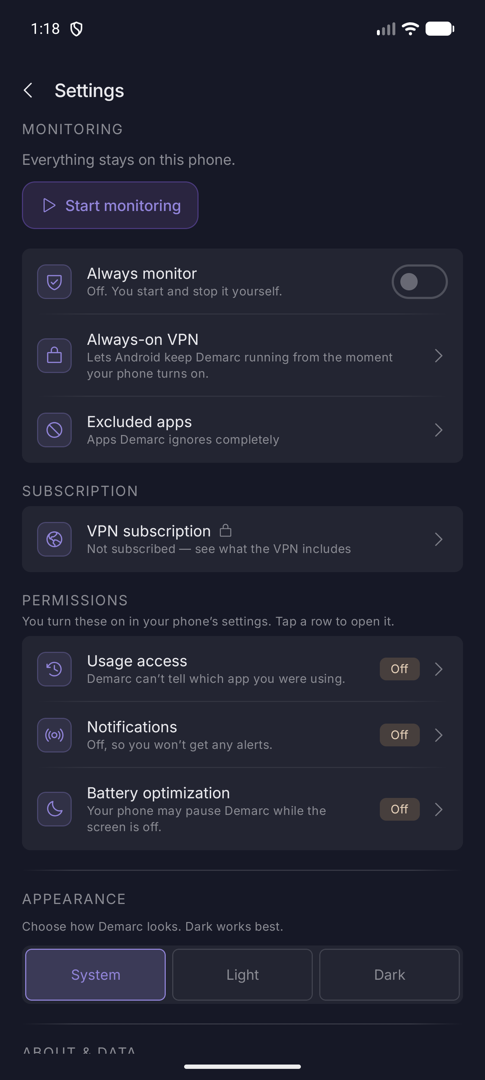
Permissions
Demarc asks for these in your phone’s settings. Tap a row to open it. Each shows On or Off.
| Permission | Why Demarc wants it | If it is off |
|---|---|---|
| Usage access | To tell which app you were using, so connections can be marked foreground or background and Timeline works. | Demarc cannot tell which app you were using. |
| Notifications | To alert you to blocks, findings and monitoring problems. | You will not get any alerts. Monitoring still works. |
| Battery optimization | So Android does not suspend Demarc while the screen is off. | Your phone may pause Demarc. While monitoring is on, nothing on the phone then gets online until it wakes. |
Demarc asks about notifications the first time you press Start, and about battery optimization on a later open. Both prompts offer Allow and Not now, remember your answer, and can be changed here.
Notifications
Six channels, so you can silence the ones you do not want in Android’s notification settings.
| Channel | Tells you |
|---|---|
| Security alerts | An app contacted a known-malicious address or domain. If it was quarantined, it says the app is cut off for 24 hours. |
| Unusual activity | An app is uploading a lot, a possible DNS tunnel, machine-generated domains, or repeated attempts at blocked destinations. |
| New destinations | A digest of first-time contacts. Low priority. |
| Firewall notices | An app you are using has no internet because Demarc is blocking it, with an Unblock button. |
| Monitoring status | Monitoring stopped unexpectedly or was turned off by the system. |
| Background activity | An app moved data while you were not using it. Low priority. |
While monitoring runs, a persistent Monitoring network traffic notification stays up, with a Stop action. It changes to say monitoring is paused, or that it is recording packets to a file.
Your data
Settings › About & data. All of it stays on the phone.
| Kept | For |
|---|---|
| Per-app sites visited, with destinations | 30 days |
| Hourly totals | 2 weeks |
| Daily totals | 90 days |
| Live connections, lookups and blocks | This monitoring session only |
Clear all data deletes everything Demarc has recorded: history, blocks, recordings and reports. It cannot be undone. How Demarc works replays the intro. Credits names every blocklist and the licence it is used under. Disclaimer is the same text the welcome screen showed. Appearance is System, Light or Dark.